The Role of AI in Improving Ecommerce Product Photos
How AI transforms ecommerce product photos: fix low-res images, remove backgrounds, normalize lighting, and create retina-ready, zoomable shots that drive conversions. Practical tips for scaling across 100+ SKUs.
Product photos are the window shoppers look through before they commit. In ecommerce, an image can win or lose a sale in the first two seconds — especially on mobile where attention is brief and competition is one swipe away.
This article explains why AI ecommerce product photos matter, the most common image problems merchants face, and how AI-powered tools (including ImageUpscales) solve them at scale. You’ll also get measurable outcomes and workflow tips for catalogs of 100+ SKUs.

Why product images make or break conversions
Shoppers judge listings visually first. High-quality photos communicate product quality, reduce uncertainty, and build trust. Key behaviors to watch:
- First-impression psychology: Customers use images to make split-second value judgments. Blurry or inconsistent photos can suggest poor quality even if the product is excellent.
- Mobile scrolling speed: On phones, thumbnails must catch attention in a feed. Clean, crisp imagery increases click-through rate (CTR).
- Zoom and detail: For categories like apparel, electronics, and footwear, the ability to zoom and inspect details lowers purchase hesitation and returns.
Common problems with ecommerce product photos
Even experienced teams struggle with image quality across large catalogs. The usual issues:
- Low resolution: Supplier images or quick phone shots don’t hold up when customers zoom.
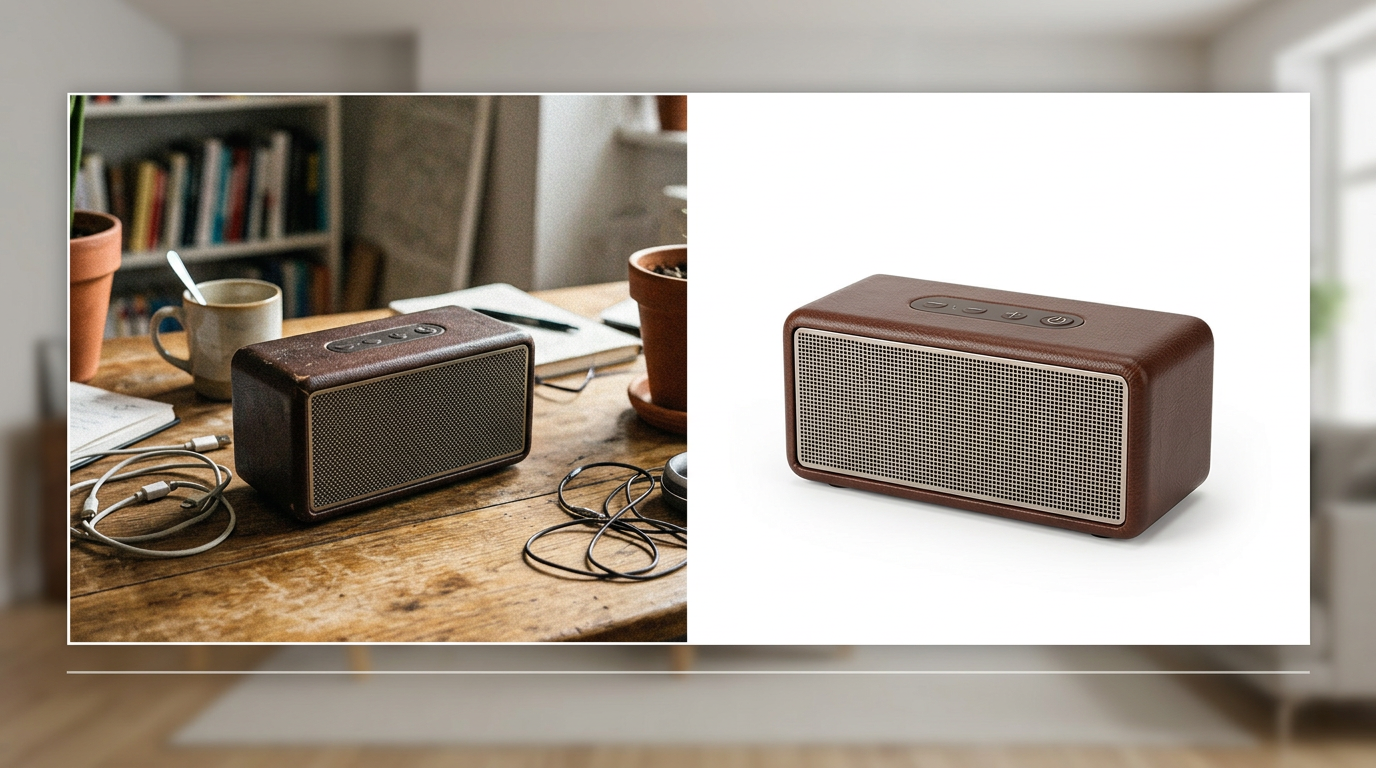
- Cluttered backgrounds: Distracting surroundings reduce perceived professionalism and make products harder to evaluate.
- Inconsistent style: Mixed lighting, color casts, and varying crop styles create a disjointed storefront that undermines brand trust.
- Blur and motion artifacts: Handheld shots without stabilization produce soft details that kill conversion on zoom.
How AI fixes product-photo problems
Modern AI combines image-processing algorithms with learned visual priors to make targeted fixes that used to require a studio and an editor. Key capabilities include:
Background removal and replacement
AI can automatically detect the product subject and remove or replace the background with a clean white, transparent, or stylized backdrop. That delivers consistent thumbnails and marketplace-ready shots without manual masking.
Lighting normalization and color correction
Algorithms adjust exposure, contrast, and white balance for consistent color across SKUs and variants. Normalized lighting makes product details easier to see and ensures colors match descriptions — crucial for apparel and home goods.
AI upscaling for crisp zoom
Upscaling models reconstruct high-frequency details so images remain sharp when customers zoom. That creates the “retina-ready” experience shoppers expect on modern devices and reduces returns because consumers can inspect the product closely before buying.
Noise reduction and motion deblur
AI denoising removes sensor noise from low-light phone pictures; motion-deblur corrects small shakes. Together these restore detail and increase perceived image quality.
ImageUpscales: what it brings to ecommerce teams
ImageUpscales applies the same AI fixes described above at catalog scale. Upload any product photo — from supplier shots to phone captures — and ImageUpscales delivers high-resolution, zoomable, marketplace-ready images with consistent background and color. Practical benefits include:
- Retina-ready images that maintain clarity at zoom and on high-DPI devices.
- Automatic background removal and standardized export presets for Amazon, Shopify, and Google Shopping.
- Batch processing and API access so teams can process hundreds of SKU images overnight.
- Color and lighting normalization to create a cohesive storefront look across channels.
Measurable business wins
Brands that invest in image quality often see quantifiable improvements across metrics that matter to marketing and operations:
- Conversion rate uplift: Cleaner, zoomable images typically increase CTR and conversion—common uplifts range from 10–40% depending on category and baseline quality.
- Lower return rates: Better product visibility reduces surprises on delivery; many merchants report 10–20% fewer returns after improving image fidelity.
- Lower ad CPA: Higher-quality creatives improve ad relevancy and click-through, which often results in 15–30% lower cost per acquisition.
- Faster time-to-market: Automated processing shortens the time to publish new SKUs, enabling quicker campaigns and fewer manual edits.
These are practical, near-term gains. The exact lift depends on your category, traffic quality, and existing image baseline, but the common pattern is clear: better images equal better economic outcomes.
Workflow tips for catalogs of 100+ SKUs
Scaling image improvements requires thought. Use these workflow tips to keep quality high without ballooning costs.
- Define baseline presets. Create export profiles for each sales channel (marketplace thumbnail, product page zoom, social ad) and apply them automatically.
- Batch process with spot checks. Run AI enhancements in batches, then do quick visual QA on a representative sample to catch edge cases.
- Integrate with your PIM. Use ImageUpscales’ API or batch upload to connect with your product information management system to automate image updates.
- Maintain naming and metadata. Keep consistent file names and include alt-text and color tags for accessibility and search.
- A/B test images. Test before-and-after images on product pages or ads to measure true ROI and refine presets based on performance.
Implementation checklist
- Audit: Identify the worst 20% of images that drive disproportionate friction.
- Prioritize: Start with high-traffic SKUs, bestsellers, and high-return categories.
- Process: Use batch AI processing with presets for channel-specific exports.
- Measure: Track conversion, return rate, and ad CPA before and after updates.

Frequently Asked Questions
Q: Can AI truly replace a professional product photoshoot?
A: AI is powerful for improving and standardizing existing photos, and it can make supplier or phone shots perform like studio images for many categories. For high-end brand imagery or complex staged scenes, a professional shoot still adds unique value. Combine both approaches: use AI to scale baseline quality and use studio shoots for hero assets.
Q: How do AI enhancements affect file size and load speed?
A: Upscaled images are higher resolution, but ImageUpscales and similar tools provide optimized export presets (WebP, JPEG with smart compression) so you can deliver retina-quality images without compromising page load performance.
Q: Is color accuracy guaranteed after AI processing?
A: AI color correction improves consistency but should be validated for critical colors (e.g., fashion). Include a color-accuracy QA step in your workflow for SKUs where exact hue matters.
Q: How long does it take to process hundreds of SKUs?
A: With batch processing and API access, hundreds of images can be processed in hours or overnight, depending on resolution and selected presets. ImageUpscales is built for this scale and offers batch and automated options.
Q: Will marketplaces accept AI-edited images?
A: Yes—most marketplaces accept AI-edited images as long as they meet size and background requirements. Use channel-specific export presets to ensure compliance with Amazon, eBay, Google Shopping, and other platforms.
Conclusion
AI ecommerce product photos are no longer a nice-to-have — they’re a conversion lever. By addressing low resolution, cluttered backgrounds, inconsistent styling, and blur, AI tools like ImageUpscales help teams deliver retina-ready, zoomable images that perform across listings, ads, and marketplaces. For catalogs of 100+ SKUs, a structured approach—presets, batch processing, PIM integration, and A/B testing—turns image improvements into measurable business outcomes.